This is the opening article of the Information Networks series, so let’s start with the question the whole series answers: when you ask for something on the internet, what actually happens?
Picture the most ordinary action online. You type learningbot.com, press Enter, and roughly two hundred milliseconds later a page is on your screen. It feels instant and atomic, like flipping a switch. It is not. In that sliver of time, your computer looked up a name, opened a connection across the planet, proved the other side was who it claimed to be, asked for a document, and received it, all through machines and cables owned by companies you have never heard of. The reason this works, reliably, billions of times a second, is not luck. It is a piece of engineering called the network stack, and understanding it is the single best investment you can make as someone who builds, runs, or debugs anything that touches a network.
The good news: the stack is built from a handful of clean ideas. Once you see them, the rest of this series is just zooming into one layer at a time.
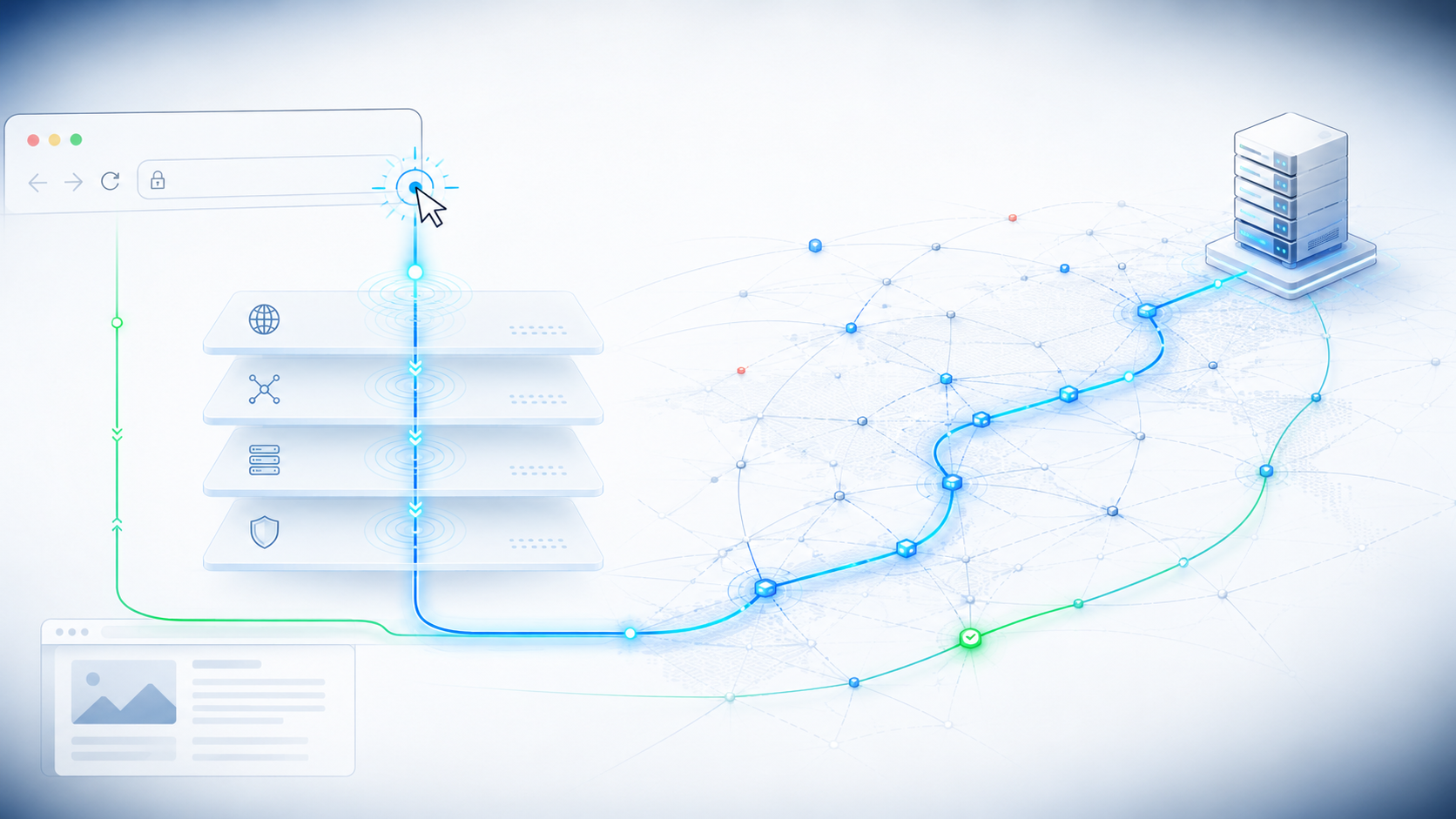
It feels instant, like flipping a switch. Underneath, one click drops down four layers, crosses the planet, and comes back as a page in a fraction of a second.
Why layers at all#
Imagine building networked software without any shared structure. Every application would have to solve the same brutal problems from scratch: how to find the destination machine, how to survive a dropped packet, how to share one cable between many conversations, how to turn bytes into electrical or radio signals. Your chat app and your email client would each reinvent all of it, incompatibly, and nothing would interoperate.
Layering is the fix, and it is the same fix software engineers reach for everywhere: separation of concerns. You slice the problem into horizontal layers, each with one job. Each layer trusts the layer below to handle its concern and offers a clean service to the layer above. A layer only ever talks, conceptually, to the matching layer on the other machine, its “peer.” Your browser speaks to the remote web server as if there were a direct line between them, blissfully ignorant of the fiber, the routers, and the Wi-Fi in between. Those details are somebody else’s layer.
That single decision, slice the problem into cooperating layers, is why the internet could grow without being redesigned. A new Wi-Fi standard can replace the bottom layer without the web noticing. A new application protocol can appear on top without touching the wires. Layers let different parts of the system evolve independently, and that independence is the whole reason the internet aged as well as it did.
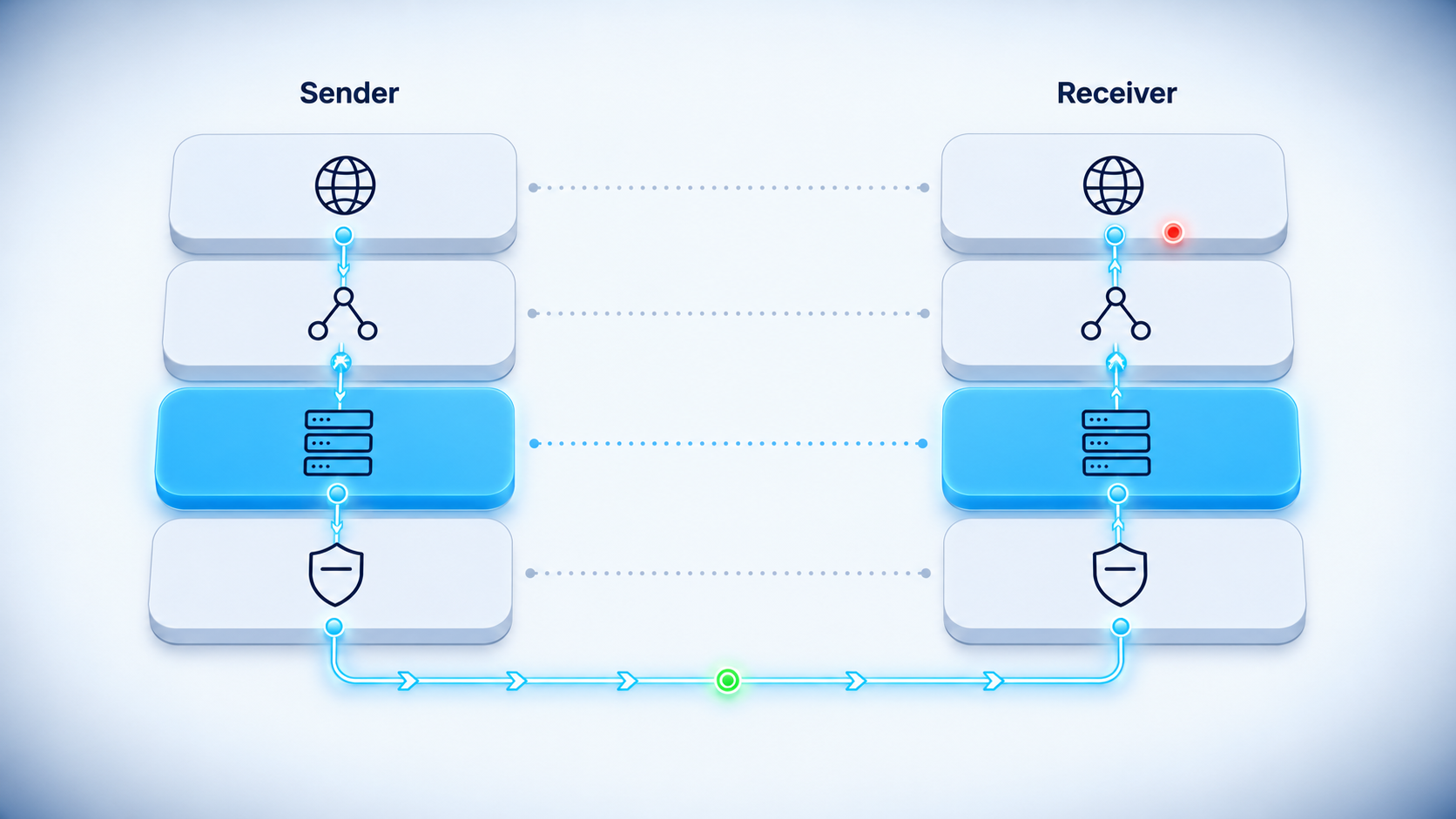
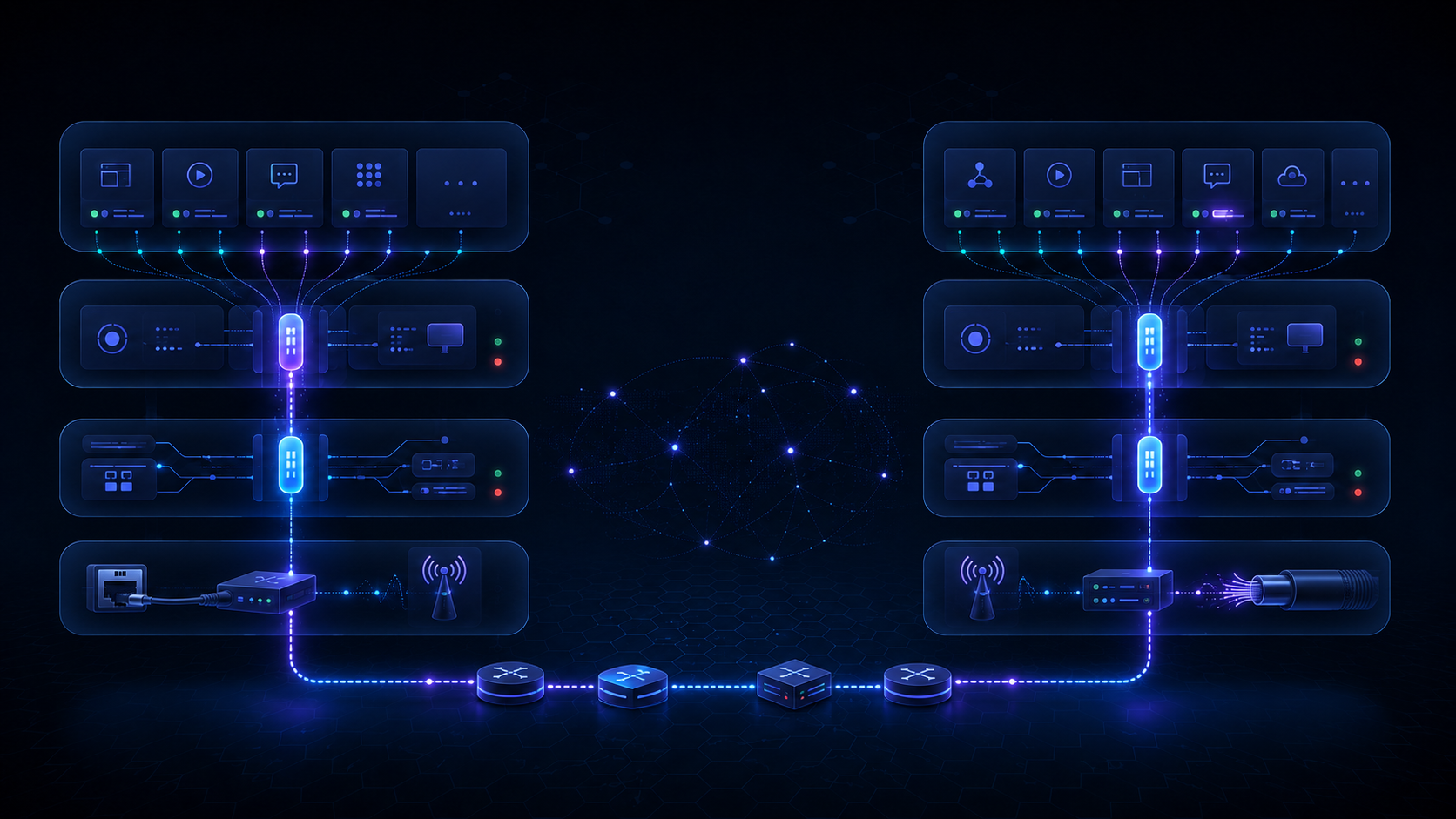
Each layer has one job and trusts the layer below. Conceptually it talks only to its “peer”, the matching layer on the other machine, while the real data travels down one stack and up the other.
Two models: the one we teach with, and the one that shipped#
If you have read about networking before, you have met the Open Systems Interconnection (OSI) model, the famous seven layers. You may also have met the four-layer TCP/IP model. People argue about which is “correct,” which misses the point. They serve different purposes.
The OSI model is a teaching tool and a shared vocabulary. Its seven layers (physical, data link, network, transport, session, presentation, application) give us precise words, so when an engineer says “that’s a layer 3 problem,” everyone knows they mean routing and addresses, not cables or web requests.
The TCP/IP model is the one the actual internet runs on. It collapses the seven into four practical layers: link, internet, transport, and application. It is messier and more honest, because it describes what was really built rather than an idealized plan.
We will use TCP/IP as our spine for the whole series and borrow OSI‘s vocabulary when it makes a point clearer. Here is how they line up.
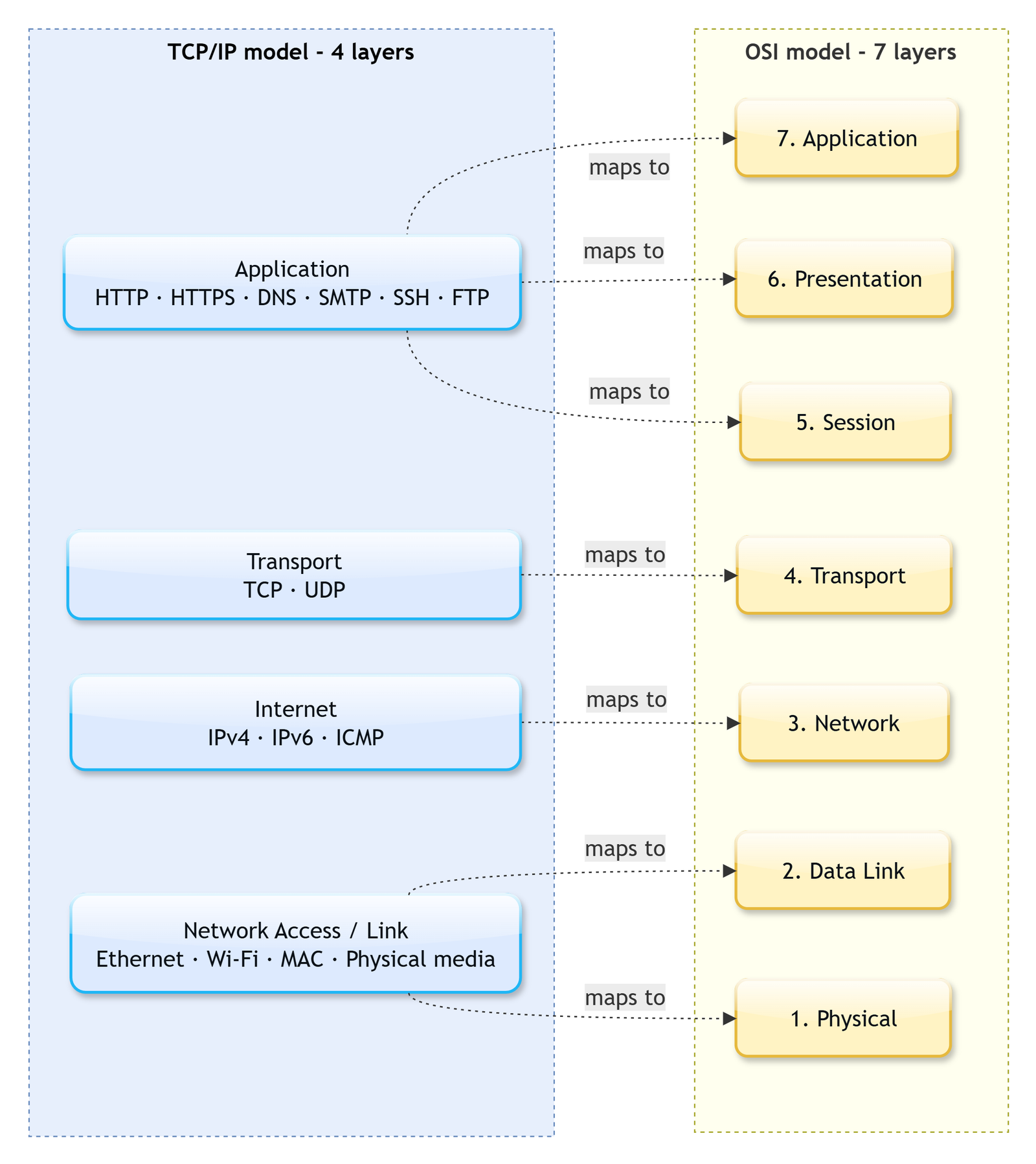
TCP/IP‘s four practical layers map onto OSI‘s seven: application absorbs OSI‘s top three, link absorbs the bottom two.
Notice that TCP/IP‘s single application layer absorbs OSI‘s top three, and its link layer absorbs OSI‘s bottom two. That is not sloppiness; it reflects that in real systems those concerns blur together. Keep the four TCP/IP layers in your head as the primary structure, and treat the seven OSI numbers as handy labels.
The four layers, top to bottom, and who lives there#
Let’s walk the stack from the top, the layer closest to you, down to the wire. The key thing to collect here is not just each layer’s job but the names of the protocols that live there, because those names are the table of contents for this entire series.
The application layer is where the protocols you actually experience live. This is the layer of the web, email, file transfer, and the support services that make all of it usable. The Hypertext Transfer Protocol (HTTP) carries web pages. The Domain Name System (DNS) turns names into addresses. The Dynamic Host Configuration Protocol (DHCP) hands a new device its settings. The Network Time Protocol (NTP) keeps clocks in agreement. Email rides on the Simple Mail Transfer Protocol (SMTP) and its retrieval cousins, and file transfer has its own family of protocols. Each of these gets real attention later in the series; for now, just file them under “application.”
The transport layer turns the network’s best-effort delivery into something an application can rely on, or deliberately stays out of the way. Two protocols dominate. TCP provides ordered, reliable, connection-based delivery: if a piece goes missing, TCP notices and resends it. The User Datagram Protocol (UDP) does almost none of that; it is a thin, fast, fire-and-forget service that lets the application decide what reliability it needs. This layer also introduces ports, the mechanism that lets one machine hold many conversations at once.
The internet layer is the heart of the whole design. Its job is to move a packet from any machine to any other machine, across as many separate networks as it takes. This is the home of the Internet Protocol (IP), which provides the addresses everything else depends on, and the Internet Control Message Protocol (ICMP), the diagnostics and error channel behind tools like ping and traceroute. Everything on the internet, every web page, every video call, every game, ultimately rides on IP.
The link layer is the bottom, where bits actually move between two directly connected devices. Ethernet frames data for a cable; Wi-Fi does the same over radio. The Address Resolution Protocol (ARP) sits here as the bridge that lets a machine find its neighbor’s hardware address. This layer is about one hop, getting data to the next device along the path, not the whole journey.
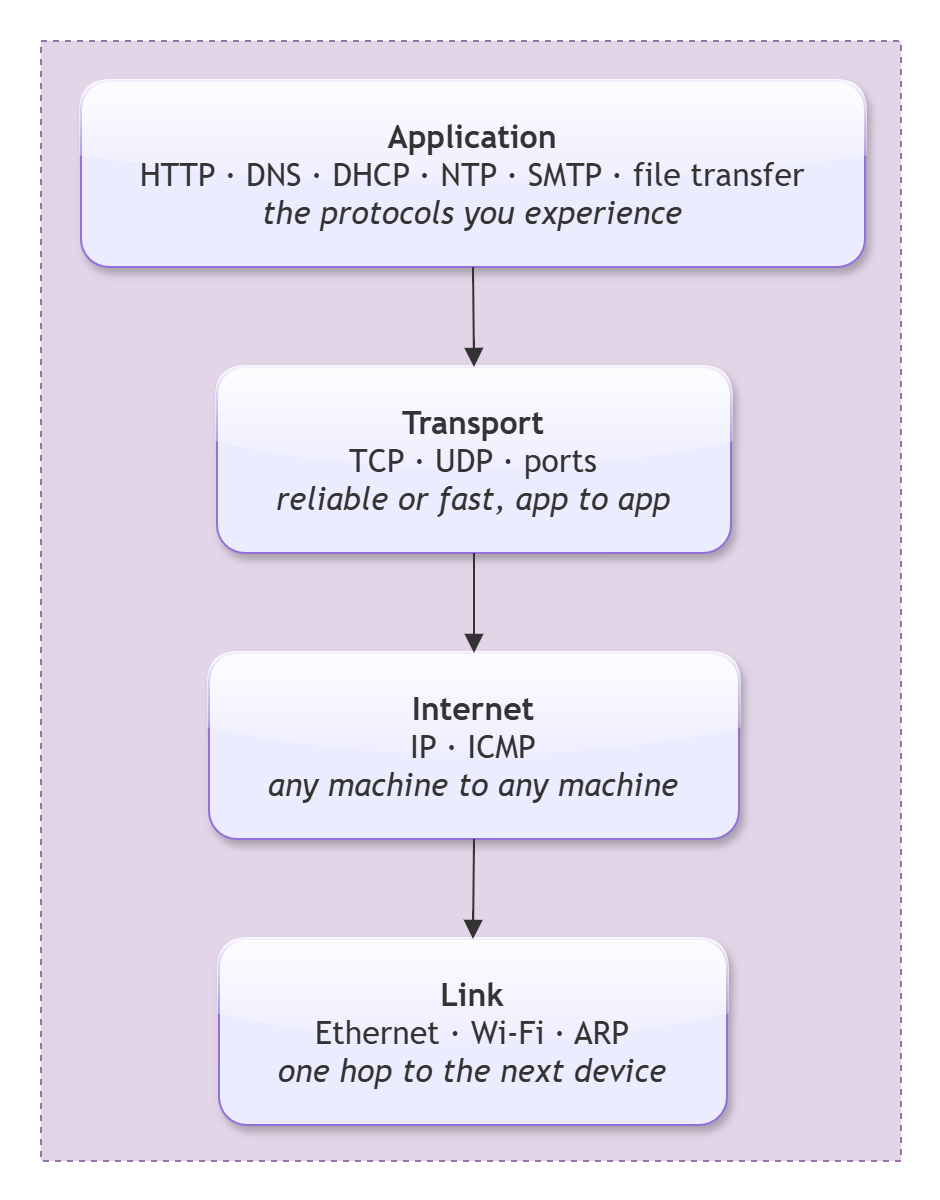
The whole series on one card: each layer’s job and the protocols that live there, from HTTP at the top to Ethernet, Wi-Fi, and ARP at the bottom.
If that diagram looks like a syllabus, that is exactly what it is. Almost every article in this series picks one box and goes deep.
Encapsulation: the nested envelope trick#
So how does data actually travel through these layers? Through a beautifully simple mechanism called encapsulation. As your data moves down the stack, each layer wraps it in its own header, like putting a letter inside an envelope, then putting that envelope inside a larger one, and so on.
When your browser sends a request, the application layer produces the HTTP message. It hands that down to the transport layer, which wraps it in a TCP header (adding things like the port and a sequence number) to form what we call a segment. That goes down to the internet layer, which wraps it in an IP header (adding the source and destination addresses) to form a packet. That goes down to the link layer, which wraps it in an Ethernet or Wi-Fi header (adding hardware addresses) to form a frame. Only then does it hit the wire as actual signals.
On the receiving machine, the exact reverse happens. Each layer reads and strips off its own header, then passes the contents up. The link layer removes the frame header and hands a packet up; the internet layer removes the IP header and hands a segment up; the transport layer removes the TCP header and hands the HTTP message up; the application finally reads the request. Each layer only ever reads the header its peer wrote. The web server’s HTTP code never sees an Ethernet header, and the Ethernet hardware never sees the HTTP request. That is layering doing its job.
flowchart LR
    subgraph Down["Sender wraps (encapsulation)"]
        direction TB
        D1["HTTP data"]
        D2["[ TCP header | HTTP data ]<br/>segment"]
        D3["[ IP header | TCP | HTTP data ]<br/>packet"]
        D4["[ Eth header | IP | TCP | HTTP data ]<br/>frame"]
        D1 --> D2 --> D3 --> D4
    end
    D4 ==> W["the wire"]
Each layer wraps the one above in its own header: HTTP data becomes a segment, then a packet, then a frame on the wire.
If you can step through that wrapping one layer at a time, watching each header get added on the way down and stripped on the way up, the whole idea clicks. Drag the stepper above from the raw HTTP message to the frame on the wire and back.
Note
The vocabulary trips people up, so pin it down once: the transport layer’s unit is a segment, the internet layer’s is a packet, and the link layer’s is a frame. People say “packet” loosely to mean any of them, which is fine in conversation, but when precision matters these words point to specific layers.
The two ideas that made the internet#
Two design principles run underneath everything above, and they explain not just how the internet works but why it won.
The first is the end-to-end principle. It says: keep the network itself simple and dumb, and put the intelligence at the edges, in the end hosts. The routers in the middle should do one job well, forward packets, and leave reliability, encryption, and application logic to the two machines actually having the conversation. This is why innovation on the internet happened so fast. Inventing the web, or video streaming, or a new app did not require permission from the network or an upgrade to the routers. You just built smart software at the edges and ran it over the same dumb, reliable packet-forwarding core.
The second is the narrow waist, and it is best pictured as an hourglass. At the top, a huge and growing variety of applications. At the bottom, a huge and growing variety of link technologies, from fiber to Wi-Fi to 5G. In the narrow middle, holding the two halves together, sits one protocol: IP. Everything runs over IP, and IP runs over everything. Because all applications agree to speak IP, and all physical networks agree to carry IP, the top and bottom can each evolve wildly without ever having to coordinate with each other. The waist stays narrow and stable while both ends explode with variety.
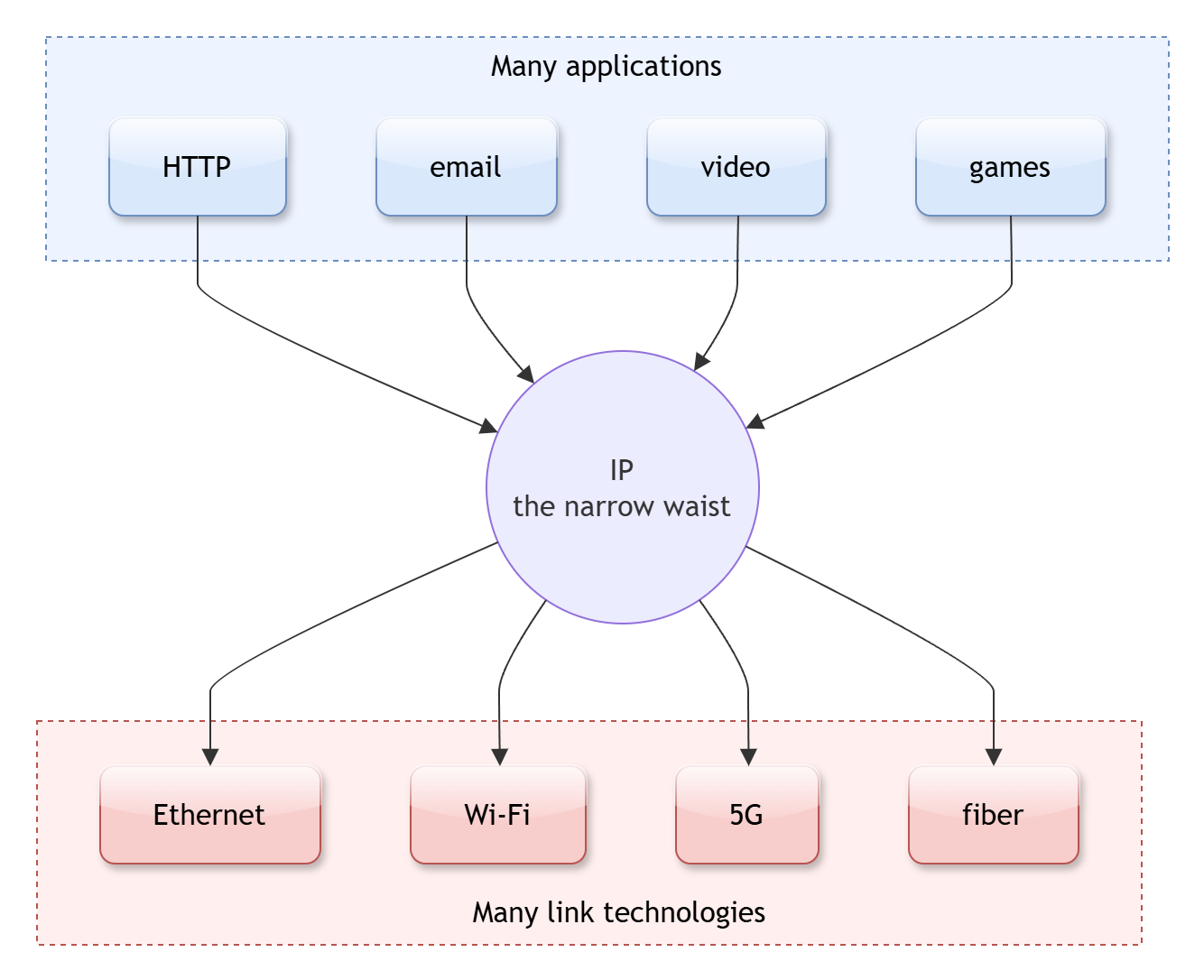
Many applications on top, many link technologies on the bottom, one protocol in the middle: everything runs over IP, and IP runs over everything.
Hold on to these two ideas. Almost every change we cover in the second half of this series, from QUIC to software-defined networking to zero trust, is best understood as a careful renegotiation of where intelligence should sit and what the waist should guarantee.
One request, end to end#
Let’s tie it all together by following a single web request the whole way, naming the protocols as they appear. This is the journey the rest of the series unpacks one piece at a time.
You type learningbot.com and press Enter. First, your machine needs the server’s IP address, because the name means nothing to the network. It sends a DNS query (over UDP, usually) and gets back an address. If your device only just joined the network, it already did some quiet bootstrapping moments earlier: DHCP handed it an IP address, a gateway, and a DNS server, and ARP found the hardware address of that gateway.
Now your browser opens a TCP connection to the server’s address and sets up encryption on top of it. Then it sends the actual HTTP request: “give me the home page.” That request is encapsulated down the stack, TCP segment, IP packet, Ethernet or Wi-Fi frame, and sent to your gateway. From there it hops router to router across the internet. Each router reads only the IP header, decides the next hop, swaps the link-layer frame, and forwards it. The end-to-end TCP and HTTP information rides along untouched until it reaches the server.
The server’s stack decapsulates the request layer by layer, its web software composes a response, and the whole process runs in reverse back to you. The page renders. Total elapsed time: a fraction of a second, across machinery spanning the planet.
sequenceDiagram
    participant You as Your device
    participant Net as Routers (internet layer only)
    participant Srv as learningbot.com
    You->>You: DNS lookup, name to IP (UDP)
    You->>Net: HTTP request, wrapped in TCP + IP + frame
    Net->>Srv: forwarded hop by hop (reads IP header only)
    Srv->>Srv: decapsulate up the stack, build response
    Srv->>You: HTTP response, back down and across
    You->>You: decapsulate up the stack, render page
The whole journey named: DNS lookup, then an HTTP request wrapped in TCP, IP, and a frame, forwarded hop by hop, decapsulated at the server, and returned.
Every single step in that diagram is a layer and a protocol you now have a name for. That is the entire value of this article: not the details of any one step, but the frame that holds all of them together.
Tip
When something on a network breaks, the stack is also your debugging checklist. Work bottom to top. Is the link up (cable, Wi-Fi)? Does the device have an IP and a route (internet layer)? Can it reach the port (transport)? Is the application itself responding (application)? Most “the internet is down” problems are really one specific layer failing, and naming the layer is half the fix.
Wrapping up#
The internet is not magic and it is not a single monolithic thing. It is a stack of cooperating layers, each with one clear job, each wrapping the layer above in its own envelope and trusting the layer below to carry it. The application layer holds the protocols you touch (HTTP, DNS, DHCP, NTP, email, file transfer); the transport layer makes delivery reliable or fast (TCP and UDP); the internet layer moves packets anywhere (IP and ICMP); and the link layer moves bits to the next device (Ethernet, Wi-Fi, ARP). Encapsulation carries data down and up, and two ideas, the end-to-end principle and the narrow waist of IP, explain why the whole arrangement scaled to the entire planet.
The short version, if you forget everything else: the network is layers all the way down, every layer wraps the one above it, and everything in the middle runs over IP.
Next up, we stop looking at the whole stack and drop to the very bottom of it. Article 2 is about the link layer: how Ethernet frames data, how a switch learns where everyone is, how ARP finds your neighbor’s hardware address, and how modern Wi-Fi became the default first hop for most of the world. Before a packet can cross the planet, it has to reach the device one cable away. That is where we go next. See you there.